

How to Withdraw Money from eSewa wallet to ATM cardless Withdrawal
Leave a Comment / Tech Tutorials / By admin
Post Views: 1,067
Step-by-Step: How to Withdraw Money from eSewa without a Card
Ever found yourself needing cash but you left your wallet at home? Thanks to eSewa’s cardless withdrawal feature, your smartphone is the only ATM card you need.
eSewa now allows users to effortlessly withdraw cash directly from their digital wallets using Everest Bank and NIC Asia Bank ATMs across Nepal. It is secure, instantly available 24/7, and completely eliminates the need to carry a physical debit card.
In this guide, we will walk you through the exact, step-by-step process of making an eSewa cardless ATM withdrawal in under two minutes.
Table of Contents
“Step-by-Step: How to Withdraw Money from eSewa without a Card
Benefits of eSewa Cardless Payment Withdrawal at Everest Bank:
Is there any limitation for transactions?
How does eSewa Cardless Payment Withdrawal at Everest Bank work?
Related Posts:
“Step-by-Step: How to Withdraw Money from eSewa without a Card
Step 1: eSewa App: go and login to eSewa app.If you don’t have it yet, you can download it from the app store and create an account.
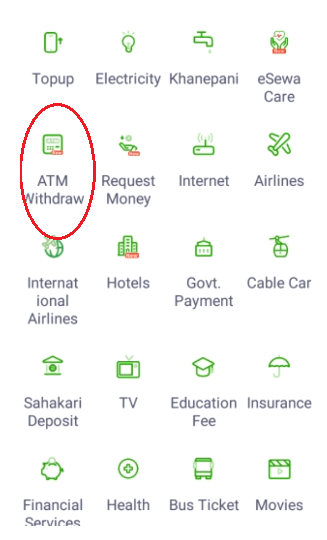
Step 2: Tap on the ATM Withdrawal option within the eSewa app.
Step 3: Now, select Everest Bank from the option.
Step 4: Transaction Details: Enter the “Withdrawal Amount”, including the purpose of a transaction, and fill up the remarks section. After that, verify the accuracy of the information before proceeding.
Step 5: Again, Tap on Confirm.
Step 6: Enter your MPIN (Mobile personal identification number)
Step 7: After all the above procedures, the eSewa app will generate a unique OTP code for the withdrawal.
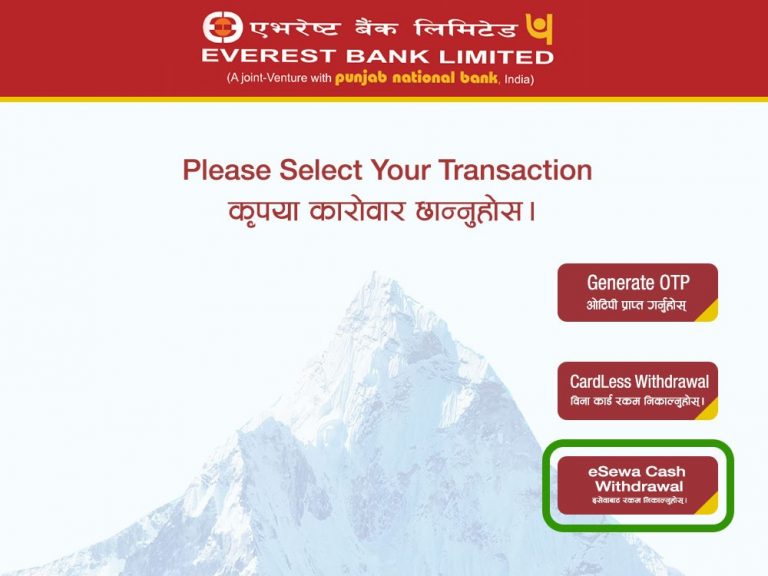
Step 8: Visit the nearest Everest Bank ATM: Select the eSewa cardless withdrawal option on the screen.
Step 9: Enter your eSewa ID which is your registered mobile number.
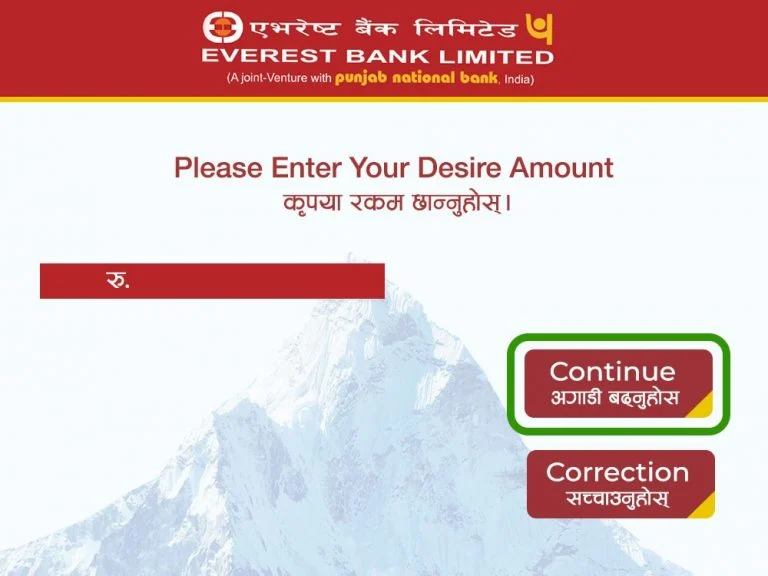
Step 10: Please enter your desired amount: and click on continue.
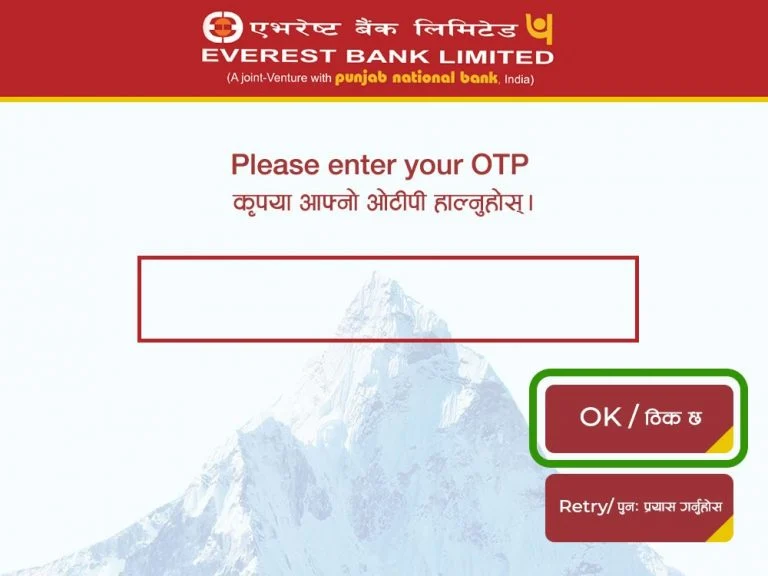
Step 11: Enter the OTP that you have received on SMS. and tap on OK.
Step 12: Finally, withdraw Cash: Collect your cash and enjoy.
Read More How To Make Money From Google AdMob in 2026 (Step-by-Step)
Benefits of eSewa Cardless Payment Withdrawal at Everest Bank:
Enhanced Convenience: With cardless payment withdrawal you can Access your funds becomes hassle-free, requiring only your smartphone and the eSewa app.
In addition, eSewa cardless withdrawal is Secure.
Furthermore, Round-the-Clock Availability: Cardless payment withdrawal is available 24/7, allowing you to withdraw funds from Everest Bank ATMs at any time, even outside traditional banking hours.
Streamlined Process: The cardless payment withdrawal feature simplifies the transaction process, saving you time and effort. No longer will you need to wait in long queues or worry about misplaced or damaged cards.
Likewise, eSewa records all cardless payment withdrawal transactions within the app, providing you with a convenient way to track your withdrawals and monitor your spending details.
Is there any limitation for transactions?
yes, there is some restriction. You can withdraw Rs 5000 per day and you can request 5 transactions in a day and you can only withdraw 25,000 per month.
Transaction TypeMaximum LimitPer TransactionRs. 5,000Per DayRs. 5,000Max Transactions per Day5 TransactionsPer MonthRs. 25,000
How does eSewa Cardless Payment Withdrawal at Everest Bank work?
Phase 1: On the eSewa App
Generate the OTP in the eSewa App:
Open the app, go to “ATM Withdraw,” select your bank (Everest or NIC Asia), enter the amount, and confirm with your MPIN. You will receive an SMS with an OTP.
Phase 2: On the Physical ATM
Go to a Supported ATM:NIC Asia or Everest Bank only.
Read More Step-by-Step: How to Set Up and Use Cardless Withdrawal in Nepal
At the physical ATM, select “Cardless Withdrawal” or “Cardless Transactions” from the home screen.
3.Enter Details and Collect Cash:
Select “eSewa Cash Withdrawal,” enter your eSewa ID (mobile number), input the exact amount, and finally enter the OTP received in Step 1.
In Conclusion:
eSewa Cardless Payment Features and Everest Bank offer an exciting development in digital Financial Services.eSewa users get an offer a convenient and secure way to access their money.
This new solution is easy for customers and does not need to depend on physical cards. In addition, this makes withdrawal easier and more secure. By using atm withdrawal you can enjoy and manage your money securely with eSewa and Everest Bank. optimized this post more easy way
Many of us know that eSewa is a popular Nepali digital wallet app and also an engaging payment platform. Now, eSewa offers a wallet-to atm withdrawal service, which is a popular service via Everest Bank’s cardless withdrawal.
It is easy and convenient for customers to withdraw money from their eSewa wallet to an atm without a physical debit/credit card.
In this post, we discuss the step-by-step process of eSewa wallet to ATM Withdraw without a any physical card its called cardless withdrawal.
User can get this amazing service through Esewa and taking its benefits. How this technology enables us to have cash in hand with our digital wallets.
Users of eSewa can withdraw cash from Everest Bank’s ATMs without an ATM card.
Now maybe you are thinking about what Cardless Withdrawal is. To clarify this you can read this article
eSewa’s cardless payment withdrawal at Everest Bank empowers users to effortlessly access their funds using a secure and convenient process.
“Step-by-Step: How to Withdraw Money from eSewa without a Card
- Step 1: eSewa App: go and login to eSewa app.If you don’t have it yet, you can download it from the app store and create an account.
- Step 2: Tap on the ATM Withdrawal option within the eSewa app.
- Step 3: Now, select Everest Bank from the option.
- Step 4: Transaction Details: Enter the “Withdrawal Amount”, including the purpose of a transaction, and fill up the remarks section. After that, verify the accuracy of the information before proceeding.
- Step 5: Again, Tap on Confirm.
- Step 6: Enter your MPIN (Mobile personal identification number)
- Step 7: After all the above procedures, the eSewa app will generate a unique OTP code for the withdrawal.
- Step 8: Visit the nearest Everest Bank ATM: Select the eSewa cardless withdrawal option on the screen.
- Step 9: Enter your eSewa ID which is your registered mobile number.
- Step 10: Please enter your desired amount: and click on continue.
- Step 11: Enter the OTP that you have received on SMS. and tap on OK.
- Step 12: Finally, withdraw Cash: Collect your cash and enjoy.



Benefits of eSewa Cardless Payment Withdrawal at Everest Bank:
- Enhanced Convenience: With cardless payment withdrawal you can Access your funds becomes hassle-free, requiring only your smartphone and the eSewa app.
- In addition, eSewa cardless withdrawal is Secure.
- Furthermore, Round-the-Clock Availability: Cardless payment withdrawal is available 24/7, allowing you to withdraw funds from Everest Bank ATMs at any time, even outside traditional banking hours.
- Streamlined Process: The cardless payment withdrawal feature simplifies the transaction process, saving you time and effort. No longer will you need to wait in long queues or worry about misplaced or damaged cards.
- Likewise, eSewa records all cardless payment withdrawal transactions within the app, providing you with a convenient way to track your withdrawals and monitor your spending details.
Is there any limitation for transactions?
yes, there is some restriction. You can withdraw Rs 5000 per day and you can request 5 transactions in a day and you can only withdraw 25,000 per month.
| Transaction Type | Maximum Limit |
| Per Transaction | Rs. 5,000 |
| Per Day | Rs. 5,000 |
| Max Transactions per Day | 5 Transactions |
| Per Month | Rs. 25,000 |
How does eSewa Cardless Payment Withdrawal at Everest Bank work?
Conclusion
eSewa cardless ATM withdrawal makes it possible to move from digital money to physical cash without relying on a traditional ATM card. The process has two simple parts: create the withdrawal request inside eSewa and then complete it through the cardless withdrawal menu of a supported ATM. At present, eSewa’s published guidance covers Everest Bank and NIC ASIA Bank for this service.
For most users, the key things to remember are simple. Select ATM Withdraw in eSewa, choose the correct bank, enter the requested transaction information, authorize it with your MPIN, and keep the OTP private. At the ATM, select the appropriate cardless transaction option and enter the same withdrawal information requested by the machine. Once the details are verified, collect the cash and check your eSewa transaction history.
The service is particularly handy when you have money in eSewa but no physical debit card with you. At the same time, remember that ATM limits, charges and menu options can change. eSewa’s currently published tariff information lists an NPR 15 ATM withdrawal fee per transaction, while its ATM withdrawal guide lists an NPR 5,000 daily withdrawal amount and NPR 25,000 monthly total request amount. Always review the latest information shown inside the eSewa app before confirming your transaction.
FAQ 1: Can I Withdraw Money from eSewa Without a Bank Account?
The cardless ATM feature is designed to let an eligible eSewa user access wallet funds through a supported ATM, so the transaction is different from transferring money from eSewa into a personal bank account and then withdrawing it. You initiate the request from your eSewa wallet rather than starting from a debit card. The supported bank ATM acts as the point where the authenticated wallet withdrawal is converted into cash. You should still ensure that your eSewa account meets the requirements shown in the app and that the ATM Withdrawal feature is available to you.
The feature can therefore be particularly useful for people who receive or maintain funds in eSewa and occasionally need cash. However, eSewa also offers a separate Bank Transfer service when you actually want to move wallet balance into a bank account. The two features serve different purposes, so choose ATM Withdraw when your goal is immediate cash from a supported ATM and Bank Transfer when your goal is depositing the funds into a bank account.
FAQ 2: Can I Withdraw eSewa Money from Any ATM in Nepal?
No. You should not assume that every ATM in Nepal supports eSewa cardless withdrawal. eSewa’s published ATM instructions identify Everest Bank and NIC ASIA Bank as the partner options for its wallet-to-ATM process. A machine belonging to another bank might accept ordinary debit cards while still lacking the eSewa cardless option.
Before initiating the withdrawal, look at the bank choices displayed under ATM Withdraw in your current eSewa application. Select the bank whose ATM you intend to visit and then use the corresponding cardless transaction menu. This simple check can save you from generating an OTP and then discovering that the ATM in front of you cannot process the transaction.
FAQ 3: What Is the eSewa ATM Withdrawal Charge?
eSewa’s currently published tariff page lists a flat NPR 15 service charge per ATM withdrawal transaction. Because service charges can be revised, you should review the charge shown on the transaction confirmation screen before entering your MPIN and completing the request. That screen gives you an opportunity to verify the cost before authorizing the withdrawal.
Remember to keep enough wallet balance available for the requested cash amount and the applicable fee. If your balance is extremely close to the amount you are trying to withdraw, the fee could affect whether the transaction can be completed. Checking the available balance first takes only a few seconds and can prevent unnecessary errors at the ATM.
FAQ 4: What Should I Do If the ATM Does Not Dispense Cash?
If the ATM fails to dispense money, first check whether eSewa shows the transaction as successful, failed, pending, or otherwise affected. Keep the transaction reference, withdrawal amount, time and ATM location available. If your eSewa balance was debited but you did not receive cash, contact official eSewa support rather than repeatedly creating new withdrawal requests.
eSewa currently publishes customer-support numbers 1660-01-02121 for NTC and 1810-21-02121 for Ncell, along with csd@esewa.com.np for general enquiries and technical support. Never give your MPIN or OTP to an unknown person who claims they can recover the transaction. Support staff can investigate transaction records without requiring you to disclose your secret MPIN.
FAQ 5: Is eSewa Cardless ATM Withdrawal Safe?
Cardless ATM withdrawal uses several layers of authentication rather than simply allowing somebody with your mobile number to collect cash. The eSewa process includes authorization through your MPIN and a one-time password sent to the registered mobile number. eSewa describes OTP and transaction authentication as part of the security measures used for wallet-to-ATM withdrawals.
Your own behaviour remains an important part of that security. Keep your phone locked, never share your MPIN, never forward an ATM withdrawal OTP, and make sure nobody is watching sensitive information while you use the machine. If an unexpected withdrawal OTP arrives when you did not initiate a transaction, treat it as a warning sign and avoid sharing it. Used carefully, the feature provides a convenient alternative to carrying a physical ATM card.
read more about how to withdraw money from an atm without a card